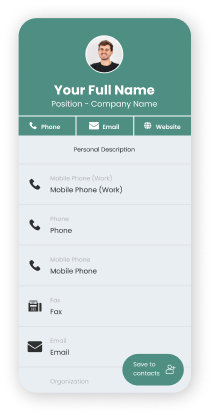
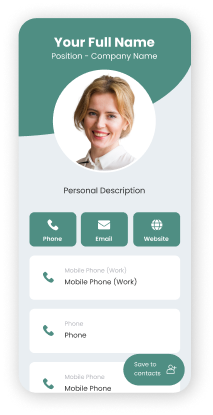
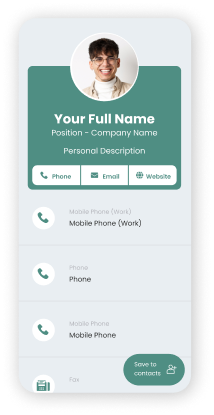
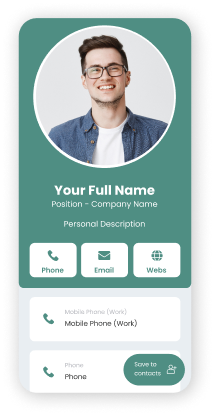
Digital Business Cards for Teams

Create a smart business card to share and collect contact information. Capture leads, track analytics, and make connections that last.

Share via: Apple WalletApple Wallet Google WalletGoogle Wallet
Customize your QR code
You can customize these templates later to match your brand
Square pattern QR code
Round pattern QR code
Star pattern QR code
Rectangle pattern QR code
Oval pattern QR code
Horizontal pattern QR code
Vertical pattern QR code
Clover pattern QR code
Circle pattern QR code
Diamond pattern QR code
free qr code
Trusted by more than 850,000 brands around the world trust QRTIGER

Your Data is Secure

Enterprise-Grade Security

ISO 27001

The most secure vCard generator

QR TIGER fully complies with GDPR and CCPA regulations, and is ISO-27001 certified
Aws
Gdpr compliant

GDPR and CCPA compliant, with ISO 27001 certification to ensure your data is protected under strict global security and privacy standards

Everything Your Team Needs to Connect Smarter

Built for your team who want to make a strong impression, build real connections, and grow with impact. Empower your team to connect, monitor, organize, and follow up with one simple platform.

Professional Business Cards

Create a sleek, custom digital contact card that stands out

Smart Collaboration Tools

Work together with your team and manage contacts easily

Accurate Tracking & Analytics

See who's engaging and measure impact in real time

One-Tap Contact Sharing

Share complete contact details with a quick phone scan

Effortless Lead Capture

Collect contacts using the built-in form for contact exchange

Instant Card Updates

Update info once, everyone gets the latest version in real-time

Ready to change how your team connects?

Join thousands of professionals who've upgraded their networking.

Digital business cards for teams of all sizes

Give your team the right tools to connect faster, stay organized, and look professional—without extra work.

What your team can do with a smart digital business card maker

  • check-circle
    Upload your own font

    Keep every card on brand, down to typography

  • check-circle
    CRM integration

    Sync every new contact to Zapier, HubSpot, or Salesforce automatically

  • check-circle
    Receive email notifications

    Know instantly when someone shares their details or leaves information

  • check-circle
    Sync contacts

    Seamlessly integrate with Google and Outlook to keep your address book updated

  • check-circle
    Contacts list page

    View all your leads and connections in one clean, searchable address book

  • check-circle
    Contacts tags

    Organize your network by type, campaign, or priority for faster follow-ups

  • check-circle
    Custom vCard links

    Share a personalized URL for direct access, making connections effortless

What is a digital business card, and why does it work better?

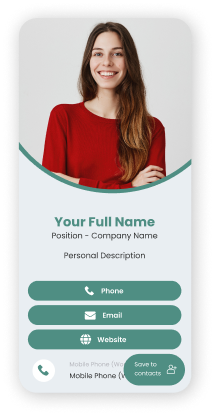
A digital business card is a modern version of your traditional paper card you're used to. Instead of handing out a physical card, you share a QR code so someone can scan it to save your details right to their phone.

One digital visiting card can store more than just your contact details. It holds all the information needed to connect in one place:

Full name and job title
Complete contact details (mobile, phone, email, fax)
Company information
Website and social links
Personal description
A photo

How to create a digital business card QR code for your team

Simple setup that doesn't require technical skills. Getting started takes minutes. Here's how:

  1. 1
    Choose a template or select a preset design
  2. 2
    Enter your complete contact info
    • Add personal description
    • Upload your photo
    • Customize your contact page
    • Add social media links
    • Select a font
  3. 3
    Generate dynamic QR code
  4. 4
    Design your vCard QR code
  5. 5
    Download & share digital business card QR code

Create a business card online in less than 2 minutes.

Share your contact details without saying a single word.

Get Started

Why digital business cards work better today

Paper business cards are easy to forget, lose, and throw away. They're easily outdated the moment your role, phone number, address, or company changes.

A digital business card solves all that.

Your details stay current & accurate
You share once, and it works everywhere
Your card lives on phones, not wallets or pockets
Updates happen instantly, without reprinting

What makes digital visiting cards smarter

At its core, this clean, professional digital card holds everything you want people to remember about you. The vCard QR code adds a smart layer on top. When someone scans it, they can save your contact details directly to their phone in just seconds. No manual entry, errors, or follow-ups asking for your number. This small detail changes how smoothly introductions turn into real connections.

For Professionals

Executives, consultants, agents, freelancers, creatives, and job seekers from different industries can present themselves clearly and confidently

For Businesses

Marketing & sales teams, support staff, recruiters, and office or field employees can share a consistent, branded contact card with complete details

For Growing Teams & Enterprises

Create hundreds or thousands of digital contact cards that follow the same structure while keeping individual unique details

Designed for real-world use

Below are real, practical ways businesses and professionals in all walks of life can use vCards every day.

Sales & Marketing

  • Conferences, trade shows, and pop-up booths
  • Client meetings where contacts are saved on the spot
  • Campaigns, flyers, brochures
  • Email signatures and presentation decks

Corporate & Enterprises

  • Internal directories and onboarding kits
  • HR and recruitment touchpoints
  • Executive and partner meetings
  • Event name badges and employee IDs

Real Estate

  • On-site entrances and property signage
  • Posters, billboards, displays, and banners
  • Social media posts and profiles
  • Direct client meetings

Healthcare

  • Hospital boards and directories
  • Clinic reception or information counters
  • Admission and discharge papers
  • Health seminars and community events

Education

  • Faculty, teachers, and staff IDs or badges
  • School events and orientations
  • Desk nameplates and office doors
  • School charts and internal directories

Hospitality & Travel

  • Hotel concierge desks and reception areas
  • Restaurant managers and event planners
  • Tour guides and travel coordinators

Finance

  • Partner meetings and client onboarding
  • Networking events and advisory sessions
  • Office directories and receiving area

Retail & E-commerce

  • Store counters and checkout areas
  • Product packaging and shelf talkers
  • Store windows and displays

Tech & SaaS

  • Product demos and investor meetings
  • Conference networking
  • Partner introductions

Freelancers, Creators, Consultants

  • Portfolio and sample works
  • Workshops and speaking events
  • Social media profiles and personal websites

Trusted by teams that value simplicity

★★★★★

The best QR Code system I've found.

It simplifies our capability to share our corporate information in a fast and effective way. With a QR code, potential customers can gain access to all of our corporate information with relative ease, on their smartphones, from anywhere.

Turn simple encounters into real connections.

Share your contacts in seconds. Keep connections alive with a scan.

Frequently Asked Questions

How can I bulk generate digital business cards for employees?

You can create bulk digital business cards for multiple employees in one go by uploading a single CSV file containing all your employees’ complete details. Use the bulk vCard QR code generator to create up to 3,000 unique vCards. This saves time and keeps everything consistent without creating them one by one from scratch.

Can I standardize the layout for all employees?

Yes. When creating digital cards for business, you can standardize or set a default design, layout, branding, or style for all employees so that every card maintains a consistent look while still allowing personal details for each employee.

Is there an admin dashboard to manage all users?

Yes, admins have access to a centralized or shared dashboard where they can manage all users, manage cards, update details, and monitor activity across the organization.

Can I assign vCards by department, role, or location?

Absolutely. You can organize and assign cards based on department, job role, brand, or location. On your dashboard, you can assign a specific card to a team member or move it to a specific folder.

Is there access control for admins vs employees?

Yes, admins can manage company-wide settings and users. Admins can add multiple team members or users and assign them a specific role—Editor or Viewer—each with different access. You can grant employees editor access to update their own information.

Can employees update their own information?

Yes, employees or team members can edit their own contact information—their phone number, photo, job title, and links. So if someone changes roles or their contact, they can easily update their business card without reprinting or creating a new card from scratch.

Do updates reflect in real-time?

Yes. When details are updated, the latest version appears right away whenever the card is opened or scanned.

Can I deactivate or reassign a card?

Yes, you can deactivate a card at any time or reassign it to another employee if roles change or someone leaves the company.

Can teams use different templates under one company account?

Definitely, you can create different business card templates for departments, job roles, or use cases while keeping everything under one account.

Can I customize cards for events or campaigns?

Yes, you can design your visiting cards or create special versions for any event, product launch, trade show, or marketing campaign, with custom designs and messaging.

Can the card collect contact details from people who scan it?

Yes. The vCard QR code includes a built-in contact form that lets people leave their name, email address, phone number, and a quick note or message after scanning the card.

Can it connect to our CRM system?

Yes, using the API integration, it can connect to your favorite CRM tools your team already uses, like Salesforce, HubSpot, and Zapier.

Can sales teams track who viewed or saved their contact?

No, but your team can see the total number of scans, including each scan’s location, time, device type, and who left their contact info. Activity tracking helps your team see engagement, such as scans and contact submissions, so they know which connections are active.

Does it support call, email, calendar booking, or website links?

Yes. Each electronic business card can include tap-to-call, email, calendar booking links, websites, and social profiles so people can reach you in the way that works best for them.

Can I use it for product pages or brochures?

Yes, you can use it for product pages, digital brochures, catalogs, landing pages, or portfolio links. This helps turn a simple introduction into a deeper conversation.

Can I track how many times a QR code is scanned?

Yes, you can track and see how many times or how often each of your vCard QR codes is scanned, which helps you measure how widely your virtual business cards are being used.

Can we see which employee cards get the most engagement?

Yes. The analytics dashboard shows which cards receive the most scans, engagement, and interactions. This helps identify what is working well across the team.

Can we track the location or time of scans?

Absolutely. Your scan data includes the specific location and time insights to help you understand when and where engagement actually happens.

Are reports available for management?

Yes, reports are readily available on your dashboard so managers can easily view clear reports that show usage, engagement, and contact activity across teams.

Can I use it with my Apple Wallet and Google Wallet?

Definitely. You can save your visiting cards or digital business cards in your Apple Wallet or Google Wallet as digital wallet passes, so you and your team can access and share them quickly from your phones, anytime, anywhere.

Is there an API for custom workflows?

Yes, there’s an API available for companies that want to connect our platform to their internal systems or build custom workflows or automations.